Paperwork
Paperwork is eating your day.
Build any checklist once. Drivers fill it out on their phone, even with no signal. Problems go straight to the people who fix them.
Clean forms on every phone
Sound familiar?
Your paper trail has gaps.
Inspection sheets come back smudged, late or not at all.
Someone retypes the forms into a computer.
A defect gets written down but never reaches the shop.
You cannot find last month’s inspection when you need it.
Signal drops in the yard and the whole process stops.
What it costs
Paper piles up. So does the cost.
No made-up numbers. Just the honest picture: every level of the pile is something a clipboard asks of you.
Hours of retyping
Data entry that adds no value to anyone.
Gaps in your records
A lost form is a hole in your paper trail.
Admin burnout
Nobody signed up to be a filing cabinet.
The fix
Build it once. Fill it on the phone. Fix what fails.
1. Build
Build the form once
Create inspections, checklists and sign-offs with a simple builder.
 Explore
2. Fill
Fill it on the phone
Drivers complete it in the Field App with photos and signatures, even offline.
Field AppExplore
See it work
Watch a failed brake become a repair.
Tap Fail on Brakes, then try it with no signal. This is the real flow.
Build it once
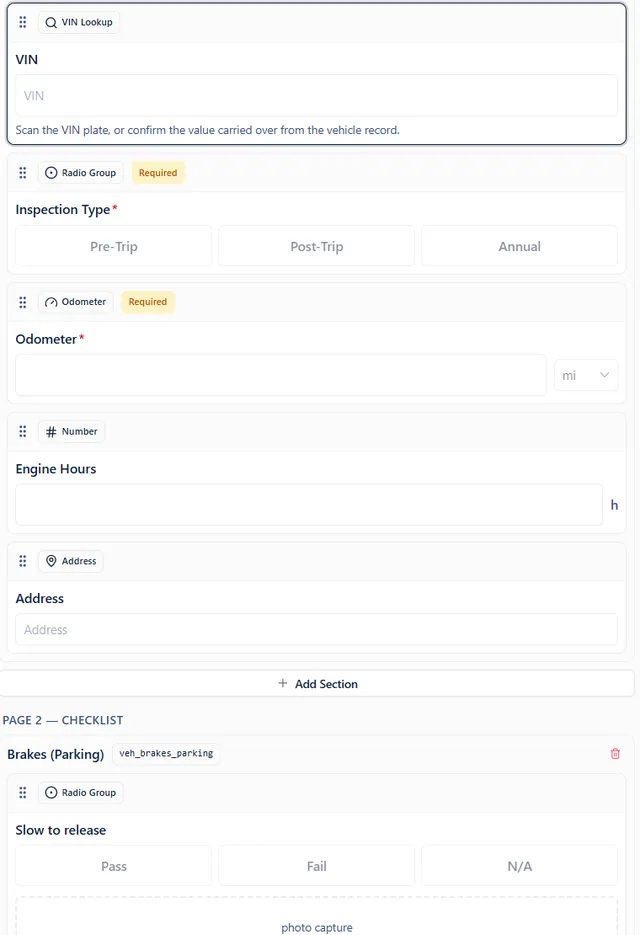
- Look up a truck by VIN
- Pick from simple choices
- Pass or fail, plus photos
Fill it on the phone
Pre-trip inspection
Unit 214
Tires
Lights
Brakes
Horn
Mirrors
2 of 5 checked
Routed to repairs
 Repair requests
A failed item opens a repair request here. Tap Fail on Brakes.
From clipboard to phone.
What changes day to day.
Clipboards and smudged copies
Clean forms on every phone
Retyping data
Answers saved the moment they are submitted
Defects written on a page
Defects sent straight to repairs
Digging through folders
Search by truck, driver or date

Walkaround, done on the phone
Paper forms, retired.
No more clipboards in the cab.
RetiredQuick answers
What if a driver has no signal?
The form saves on the phone and sends itself when the signal comes back.
Can a relief driver or a shop fill one out?
Yes. Share a link and they can complete the form without a Fleet Unify account.
Ready to see your fleet in one place?
Bring your questions and the tools you use today. We will show you how it all fits together.